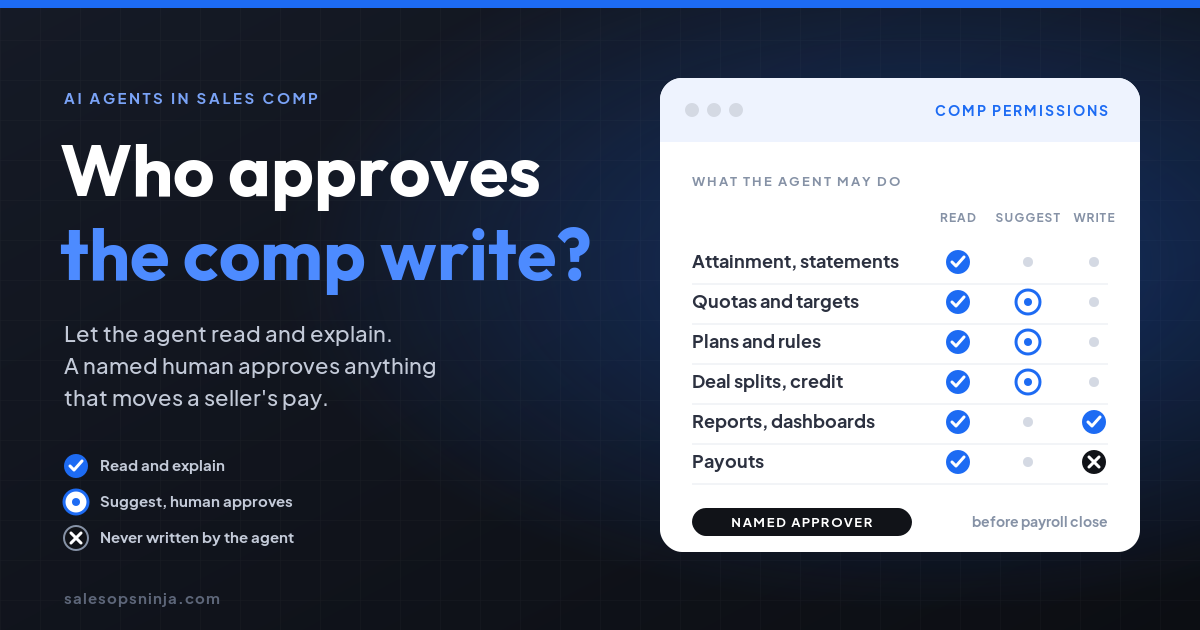
It can prepare the change, but a named human should approve any write that moves a seller's quota, plan, or credited deals. Let the agent read and explain comp freely, suggest the edits, and keep payout math out of its reach.
I'm Michael Thomas Zajac, a sales operator in Hermosa Beach. I have fixed a broken comp plan, and I have built the systems where a quote turns into an invoice. Both taught me the same thing: the data that decides what someone gets paid needs an owner before it needs automation.
What did Qobra and Dust just ship?
On October 12, 2026, Qobra CEO Antoine Fort announced that the Qobra MCP is now native in Dust, the platform companies use to build and run AI agents on their own data. Here is what the announcement says:
- Dust agents get 65 actions in Qobra. 45 read quota attainment, commission statements with line-by-line breakdowns, plans, reports, dashboards, and audit logs. 20 write users and groups, data tables and records, quotas, plans, reports, dashboards, and requests.
- Access is scoped to the user. The agent gets the same permissions as the person signed in. A rep sees fewer tools than an admin.
- Every write lands in the audit trail, tagged as an MCP action.
- Statements and payouts are never edited by an agent.
- Qobra describes the write workflow as "the admin validates, the agent executes." An agent that answers a rep's question can also assign the user, set the quota, split the deal between two reps, and reply in the request thread, under the admin's review.
I like most of this. Comp questions are the most asked and least answered questions in a sales org. An agent that pulls the statement, the deals behind it, and the plan rule that explains it is a real gift to a comp admin buried in screenshots.
Where does it get risky?
Notice what Qobra kept off limits: statements and payouts. That is the right line, and it tells you where the real exposure sits. The payout is calculated from quotas, plans, and credited records. Those are exactly the things the agent can write.
Three things to watch:
Permissions are not policy. "Same permissions as the user" means an admin's agent can do anything the admin can. That is a safety floor, not a decision about what an agent should do without a second look.
Small edits move real money. A deal split, a quota fill, or a rule attached to a plan changes what someone earns at the end of the period. Nobody types "commission" into the field, but the commission moves anyway.
The audit trail tells you what happened, not whether it was right. Qobra makes the trail the way finance checks what agents did. Good. But a log reviewed after payroll closes is a cleanup tool, not an approval.
What did fixing a comp plan teach me?
At ICON Aircraft we sold a B2C airplane with a $400K+ average selling price. The comp plan paid reps a flat commission no matter how much they discounted. On a plane at that price, a small give to close the deal cost the rep almost nothing and cost the company a lot.
So the plan was rewarding the wrong behavior. I built models of alternative plans, took them to the CEO, and he approved a new structure that rewarded holding price instead of moving volume at any discount. That comp fix was part of how ICON grew 114% year over year.
The lesson for agents: comp plans are behavior instructions. Sellers read the plan more carefully than any playbook you will ever write. A quiet change to a quota or a rule is a change to how your team sells, and it deserves the same scrutiny the original plan got from the CEO.
Why does the approval path matter as much as the data?
At Intertrust I did not own comp. I owned the systems where money moved. We standardized quoting in Salesforce CPQ, used approval workflows to decide when Product, Professional Services, Sales Engineering, or Legal actually needed to weigh in, and connected CPQ to NetSuite through Celigo so the signed deal became an invoice without anyone rekeying it.
The principle was simple: standardize the repeatable path and route the exceptions to the right human. The leaks I found were the changes that skipped that path. Renewals could go out at the prior year's price without the system treating the missed increase as a discount, so no manager ever saw a discount request.
A comp agent with write access is the same risk in a new place. The fix is the same too: decide which changes are routine and which ones need a named person before they land.
I made the same argument for money in billing in How do you let AI touch billing without writing money on its own? Comp is the seller's side of that ledger, and it is personal.
What can an agent read, suggest, or write in comp data?
Here is the matrix I would put in front of RevOps, Finance, and Sales leadership before turning on write access. Read means the agent can pull and explain it. Suggest means it prepares the change and a named human approves it. Write means it can make the change on its own, logged.
| Comp data | Read | Suggest (human approves) | Write on its own |
|---|---|---|---|
| A rep's own attainment and statement | Yes, for that rep | No | No |
| Team attainment and bonus tracking | Yes, managers and comp | No | No |
| Plan rules and commission letters | Yes, to explain a number | Plan changes | No |
| Quotas and targets | Yes | Yes, every change | No |
| Deal credit, splits, and record adjustments | Yes | Yes, every change | No |
| New hire added to an existing plan and group | Yes | Yes, during the pilot | After the pilot, if the plan and group already exist |
| Reports and dashboards | Yes | No | Yes |
| Replies in a comp request thread | Yes | Yes, when the answer changes pay | Yes, when it only explains |
| Statements and payouts | Yes | No | Never |
Two rules sit under the table. First, the person approving a change cannot be the person whose pay it changes. Second, if a change touches more than one rep's earnings, like a split, both the comp owner and the sales manager sign off.
What should you do Monday?
- Name the comp data owner. One person who approves agent changes to quotas, plans, and credited records. Not "RevOps." A name.
- Fill in the matrix with your team. Use the table above as a starting point. Write down every cell where you disagree, then settle it before access goes on.
- Turn on read first. Let the agent answer "why did my commission change?" for a full cycle. Count how often the answer was right and how often a human had to fix it.
- Check who the agent acts as. Since access follows the signed-in user, look at who will run the agent. An admin login running unattended is your biggest exposure.
- Route every write through a request. The agent drafts the quota fill or the split, and the owner approves it in the thread. No silent edits.
- Review the audit trail before payroll closes. Pull every agent-tagged change for the period and have the comp owner sign off before payouts are calculated, not after.
- Freeze writes near close. Pick a cutoff before each payroll close. After it, the agent can read and explain, but every change waits for a human.
The agent can answer the question in seconds. A person still has to own the number on the paycheck. Decide who that is before you turn on write access, not after the first disputed statement.